Designed for organisations running sensitive, regulated, or business-critical workflows in Microsoft Power Automate. Ideal for teams that require strict control over data residency, security architecture, and governance within their Azure environment.
Encodian Flowr deployed directly within your Microsoft Azure environment. Document generation, conversion, transformation, and AI processing run entirely inside your environment, with either defined monthly capacity or unlimited automation.
Built for organisations that cannot rely on shared SaaS infrastructure. Azure Deployment provides a predictable commercial structure, architectural control, and alignment with compliance requirements without limiting automation performance or scale.
Secure, isolated document automation deployed directly within your Microsoft Azure environment.
Encodian Flowr runs entirely inside your Azure tenant, ensuring all document generation, conversion and other Flowr actions execute within your infrastructure. With no shared SaaS platform and no external document processing, organisations retain full control over data residency, governance, and compliance.
Choose from either usage-priced or unlimited Dedicated plans.
Enable secure document automation across citizen developers and technical teams without introducing external processing risk.
Reduce custom development and maintenance overhead using production-ready automation actions inside your Azure environment.
Annual pricing with either set monthly credits or unlimited automation enables accurate forecasting and budget control.
All document processing runs inside your Azure environment, supporting strict compliance and governance standards.
Choose the right Dedicated Plan for your organisation based on required automation volume.
● 18,000 credits per month
● 230+ Power Automate actions
● Fixed annual pricing
● Deployed in your tenant
● UNLIMITED credits
● 230+ Power Automate actions
● Fixed annual pricing
● Deployed in your tenant
Our team supports you throughout deployment and adoption, from initial setup through to scaling automation across your organisation.
Speak with our team to discuss your automation requirements and whether a Dedicated plan is the right fit for your organisation.
Flowr is deployed directly into your Microsoft Azure tenant. All document generation, conversion, and processing runs entirely within your environment. Data never leaves your infrastructure.
Dedicated includes a fixed monthly credit allocation and is designed for organisations with secure, controlled automation needs.
Dedicated+ removes all usage limits and provides unlimited automation inside your Azure tenant.
Yes. Dedicated+ does not use credits, caps, or per-use pricing.
Yes. All Dedicated and Dedicated+ plans include installation at no additional cost.
Manual installation ensures access to the latest monthly connector updates.
Automated installation allows you to self-install without granting Encodian access.
Installation typically takes 2 to 4 hours once scheduled.
Manual installations are usually scheduled within three weeks of order confirmation. Automated installations can begin immediately.
Flowr uses Azure PaaS services only and does not require virtual machines. Resource requirements vary based on usage and workload profile.
We use the following Azure PaaS services:
Yes. Flowr is installed directly into your Azure tenant and designed to support strict data residency, security, and governance requirements, including regulated industry environments.
Dedicated deployments include two free feature updates per year.
Bug fixes and security updates are always provided at no cost.
Yes. Additional feature updates can be purchased if required.
You can upgrade from Dedicated to Dedicated+ at any time to remove usage limits and enable unlimited automation within your Azure tenant.
Yes. After installation and validation, you can revoke Encodian’s access to your Azure tenant.
Yes. Both Dedicated and Dedicated+ integrate natively with Microsoft Power Automate.
See our handy infographic for a breakdown of the technical side of things below:
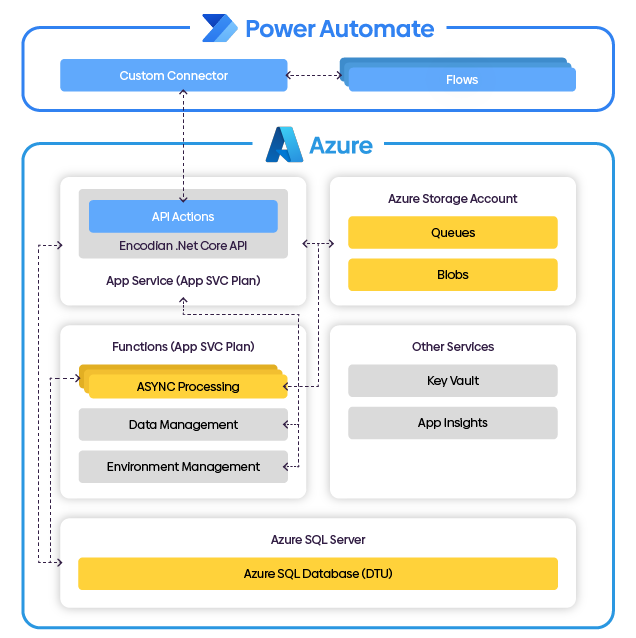
See Support site for more information.
Want an automation solution but don’t have isolated environment requirements?
Encodian Flowr has various SaaS plans.
Flowr

Automate and generate documents.